
Our local language-model service has been running on a new board since late August, and since September 4 it has ten RTX 3090 attached instead of eight. All ten are working. That is the actual point of the whole rebuild: local models have turned into an everyday tool here, a service that several developers hit at the same time with their coding agents. The previous article was about that service — two clusters of four cards each, behind a proxy of their own. This one is about the metal it runs on.
Four things the new build can do that the old one could not:
- Room for up to 19 graphics cards instead of eight.
- Up to ten cards on a single CPU. The board has two of them, and a model of our size therefore never has to compute across the boundary between them. Why that matters so much comes further down.
- A sturdier attachment. The cards connect to the board over SlimSAS cables and a small adapter board. The old build used the wide PCIe ribbon cables, which are extremely sensitive to bending. SlimSAS cables are also allowed to be longer, and that is the only reason a build across several levels works at all.
- The jump from eight cards to ten.
In between lie a good ten days of troubleshooting, three cards we thought were dead, two series of crashes, one card we had to open up — and a suspicion we held ourselves for a while: that the new platform was simply slower than the old one. It was wrong. How we got rid of it is the most instructive part of the story.
Why a board with 19 connectors
19 is not a rounded number. That is how many SlimSAS sockets sit on the board: narrow cable connectors, each carrying eight PCIe lanes out of one of the two CPUs. A cable plus an adapter board — together a riser — turns one of them into a slot for a graphics card. Nine of these sockets hang off the first CPU, ten off the second. The assignment is hardwired and cannot be changed in the BIOS.
The alternative would have been to swap platforms every two expansion steps: new board, new CPU, new memory, each time for a few more cards. A board with 19 connectors ends that carousel for the foreseeable future. The next expansion step is a card, not a new computer.
| Old rig | New rig | |
|---|---|---|
| Board | Supermicro H12SSL-i | ASRockRack ROME2D32GM-2T |
| CPU | one EPYC 7443P, Zen3 | two EPYC 7402, Zen2 |
| Maximum boost clock | 4.03 GHz | 3.35 GHz |
| Populated memory channels | 5 | 2 on the first, 4 on the second CPU |
| Connectors for graphics cards | 8, all in use | 19, 10 in use |
The 19 connectors are probably not free. In the block diagram in the manual, some of the links that would otherwise tie the two CPUs together run to slots instead. How narrow that leaves the connection between the sockets is not in the manual, and we have not measured it so far. That suspicion is one reason we prefer to keep the cards of one model on a single CPU anyway.
The new chassis: aluminum instead of wood
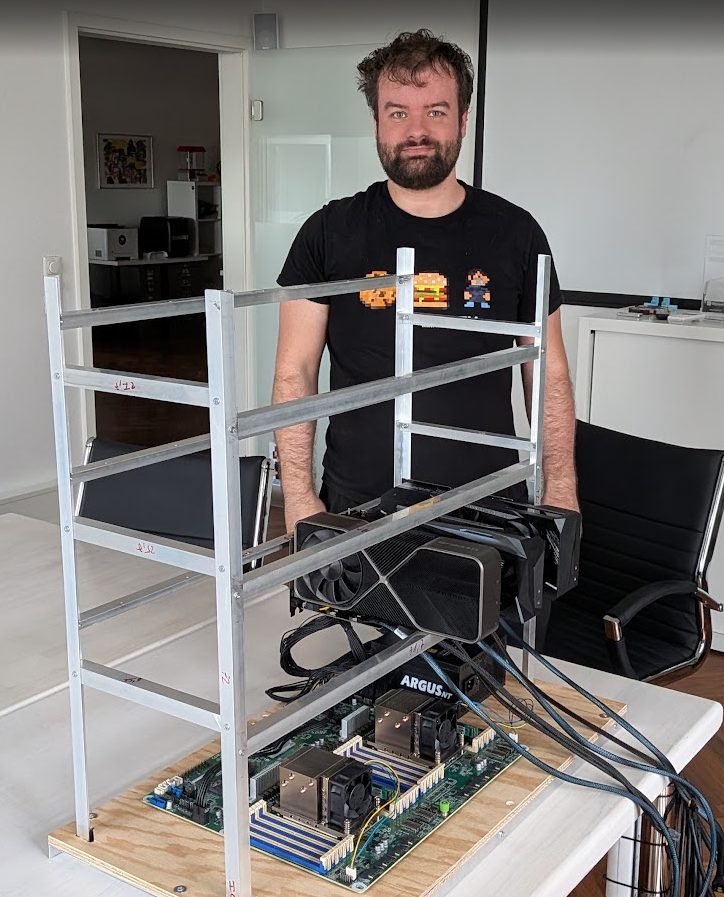
The current frame stands on a wooden base, and the cards sit far too close together in it. What that costs is in the log: two cards throttled under sustained load while every other card stayed between 51 and 65 °C and ran at full speed. One of the two sat at 73 °C, the other at 81 °C — both far below the 95 °C at which the compute die starts throttling. What triggered the throttling was memory. On the 3090 the GDDR6X sits on both sides of the board and clamps down at around 110 °C. The fans on the affected cards were already spinning at 74 to 78 percent by then.
The awkward part is that GeForce cards do not report memory temperature at all: the corresponding query simply returns N/A. In normal monitoring the problem is therefore invisible. The only reliable clue is a status field in which the card reports the reason for its throttling, and you have to think of looking there in the first place. The effect makes itself felt regardless, because the four cards in a group wait for one another at every compute step, and the slowest one sets the pace for all of them.
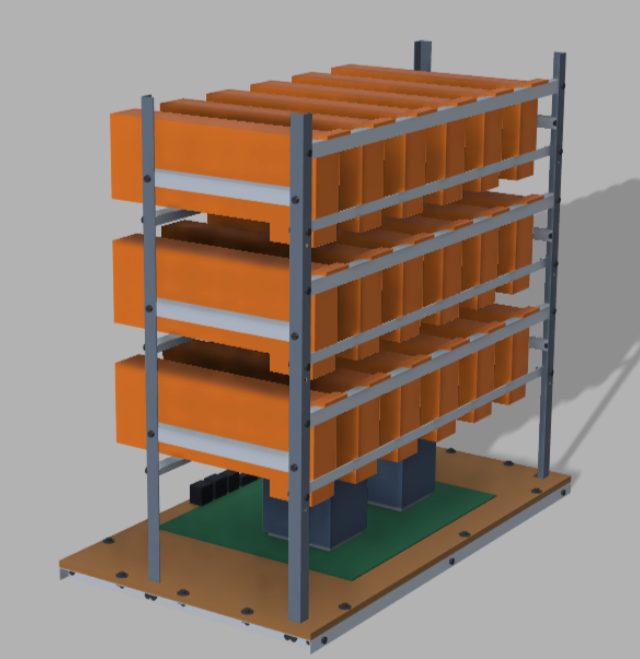
The design at the top of the article therefore budgets considerably more space between the cards. The frame is built from aluminum extrusion rather than wood, because 18 graphics cards add up to a weight for which a wooden frame is no longer the right answer. 18, not 19: the nineteenth connector stays empty, because the mechanical side hits its limit before the board does.
Three dead cards — and not one of them was broken
While we were still copying the model data over from the old rig, the first card dropped out. For events like that, the NVIDIA driver writes an error number into the system log, a so-called Xid. Here it was Xid 79, “fallen off the bus”: as far as the driver was concerned, the card had simply vanished. Shortly afterward every remaining card reported Xid 154, “Node Reboot Required” — from that point on, continued operation cannot be trusted.
The next morning, eight minutes after a restart, two more cards were hit in the same second: one fell back from eight PCIe lanes to four, the other lost its link entirely. Three cards within a day, all in adjacent positions in the frame. That looked like a hardware failure.
During the rebuild the cause turned up: a loose contact at the PCIe power connector. The cable itself was fine, it just was not seated. After reseating it, both cards from that morning ran again at full link width and without errors, and the slot where two cards had died one after the other now carries a third one without incident.
That leaves the first card, the one from the day before. We had written it off as a total loss and pulled it out. It is now the tenth card in the rig and runs without a single error. That completes the picture: not one card was defective, not one slot was defective. Every failure came down to connectors and cables.
Three things we wrote down from that:
- Xid 79 here almost always means a contact problem. Before filing any warranty claim, push the power and data connectors home at both ends first.
- Four lanes instead of eight is the early warning. The transfer rate of a PCIe link is dialed down at idle to save power; the number of lanes is not. Any halved width is therefore a finding. It happened twice, both times on a link that failed shortly afterward or had just failed.
- A spatial pattern is a strong signal. All three failures sat in adjacent positions. That pointed at the cabling in that corner, and that is where it was.
How to find the slot a dead card sits in
That is harder than it sounds. GPU index and PCI address shift as soon as a card drops out: every address after it moves up, and the same physical card then carries a different one. The UUID, a card’s immutable identifier, would be stable — except that a dead card no longer reports one. Standing in front of the frame with a screwdriver, that leaves you with nothing.
What does work is the root port: the attachment point inside the CPU itself where the eight PCIe lanes come out. It is wired to exactly one SlimSAS socket on the board, never shifts, and stays visible even when the card behind it is dead. On top of that, every root port carries a slot number that the board firmware assigns itself and that encodes the socket’s name directly. A small inventory script reads that out and prints socket name, responsible CPU, link width and whether the card is alive, one line per slot. It has held up across several rebuilds; during one of them the system renumbered the entire PCI tree, and the firmware numbers still matched. In practice, one distinction out of that output carries most of the weight. If a socket no longer appears in the PCI list at all, no link was ever established — cable, power or card. If it is there and the card does not answer, the card was there and died in operation. Those are two different searches.
The power socket that backed out
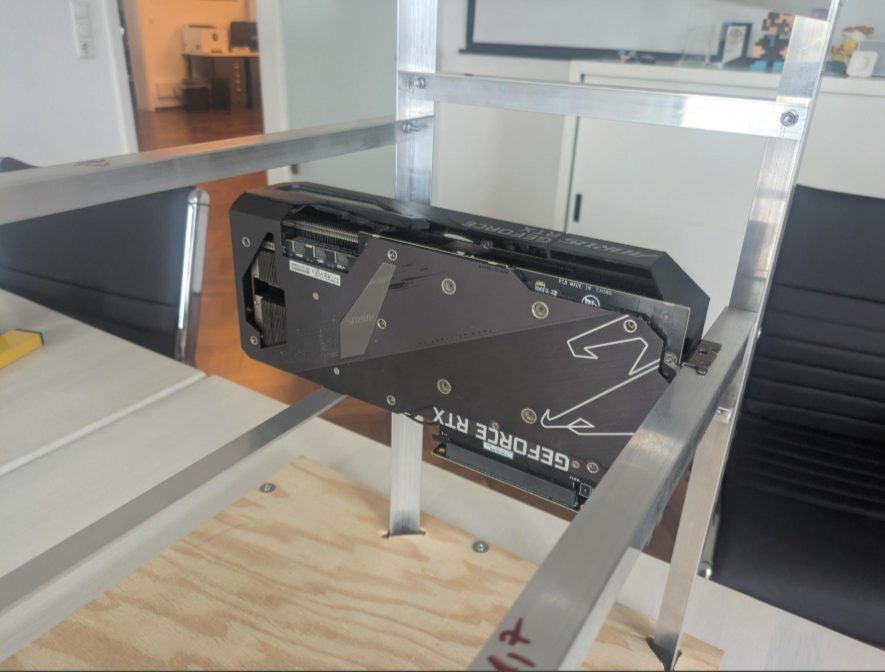
One card kept us busy for a good while after that: it kept disconnecting. We first blamed the power supply. That was wrong, and we only found the real cause when we opened the card up. On this Gigabyte model, the contact pins of the PCIe power socket pushed backward out of the socket housing as the power cables went in. A secure contact was no longer possible.
On this model the socket sits on a small sub-assembly of its own, with a wiring harness, and that assembly can be replaced; one vendor asks around 18 euros for one of the two parts. Our fix was simpler: plug in the power cables, then let a heat-resistant, curing plastic adhesive run into the openings from behind. The connection has been solid ever since.
The reboot that left nothing behind
The second failure series started in late August at a different slot and looked completely different. The server hard-reset while loading the model — no kernel message, no error number, no crash dump. The log breaks off mid-sentence. From the outside it looks like a power cut. Because the containers were set up to bring themselves back up, this repeated five times in 23 minutes. A reboot costs 1 minute 37 seconds on this board, measured with nine cards, and a good minute of that goes to the firmware alone, which according to the manual waits around 90 seconds for the board’s management controller. In a debugging session that consists mostly of reboots, that adds up.
The kernel stayed silent because it never got the chance. The reason was in a register where the CPU records what caused the previous reset:
x86/amd: Previous system reset reason [0x08000800]:
         an uncorrected error caused a data fabric sync flood event
A sync flood is AMD’s emergency stop. If an uncorrectable error occurs in the data fabric — the CPU’s internal interconnect that ties cores, memory controllers and PCIe together — the machine halts on the spot without telling the operating system anything. Since then, that register is the first place we look after an unexplained reset.
Narrowing it down took swap tests: three known-good cards plus one suspect at a time. One combination crashed reproducibly after 35 seconds, all the others ran through. That located the suspect position, and the actual work started. A slot has three suspect parts hanging off it: the card, the slot itself and the riser in between, meaning cable plus adapter board. We swapped each of them individually. Gen4 in the table stands for the fourth PCIe generation, which the board normally uses to attach the cards, Gen3 for the previous one at half the transfer rate.
| Setup | Link | Runs | Crashes |
|---|---|---|---|
| original riser | Gen4 | 2 | 2 |
| new adapter board, old cable | Gen4 | 3 | 1 |
| new adapter board, Gen3 forced | Gen3 | 3 | 0 |
| new cable | Gen4 | 3 | 0 |
| control run, different card in the same slot | Gen4 | 3 | 0 |
Neither the card nor the slot was defective, the same result as in the first series. The fault sat in the riser, and there mostly in the cable: the new adapter board turned “always broken” into “occasionally broken,” and only the new cable made the slot clean.
The third row is still the most useful one in practice. Switched back to Gen3, the fault was gone immediately, and it cost nothing. Our service moves around 270 MB/s over a link like that, and Gen3 delivers about 8 GB/s on eight lanes. That is under four percent utilization. So when a riser cannot handle Gen4 reliably, half the transfer rate is a workable stopgap for this load. It does not survive a reboot, though; the BIOS sets Gen4 again afterward.
Why the CPU is part of GPU compute
That a CPU has a say in the throughput of a GPU service sounds wrong at first. The reason lies in a property of GeForce cards: they cannot exchange data with one another directly. In the production driver that path is not enabled for GeForce, and the tool that lists the links between cards reports “chipset not supported” for every pair. No BIOS switch changes that. On the old rig the feature was off as well, so it is a constant across both platforms.
The consequence hits the heart of the work. Our service runs with tensor parallelism across four cards: every weight matrix is split into four parts, and after each compute step the four cards combine their intermediate results so that all of them continue from the same state. With no direct path between the cards, that combining goes through the host’s main memory. In the usual ring form, four cards mean six consecutive stages, and every stage is one round trip card → main memory → card.
Speculative decoding adds to that: a small draft model proposes eight tokens at once, and the large model checks them in a single pass. For this model, one such verification step looks like this:
64 layers × 2 reductions × 6 ring stages
    = 768 round trips through main memory per verification step
At roughly 29 verification steps per second, that comes to about 22,000 such round trips per second. What counts here is the latency of each individual round trip. With four cards, memory bandwidth is only about 12 percent utilized, PCIe bandwidth 2.7 percent.
The 12 percent that misled us
Those exact 12 percent led us astray. The utilization looked harmless, so more memory bandwidth seemed pointless, and a memory expansion slid down the list. Until September 4 the rig therefore ran with a single populated memory channel per CPU and 61 GiB.
The mistake sits in the word “average.” A memory channel is its own path from the controller to the modules; with only one channel populated there is no parallelism, and every request waits in the same queue in front of the same controller. At 22,000 small round trips per second, that waiting time decides throughput. Traffic between the cards also grows roughly with the square of their number: going from four cards in a group to ten corresponds to something like six times the load on main memory, which on one channel would be around 70 percent utilization. That number is calculated, not measured. The lesson holds beyond this rig anyway: low bandwidth utilization does not prove that more memory channels are useless. For latency-bound loads with many small transfers, the number of channels is a factor in its own right.
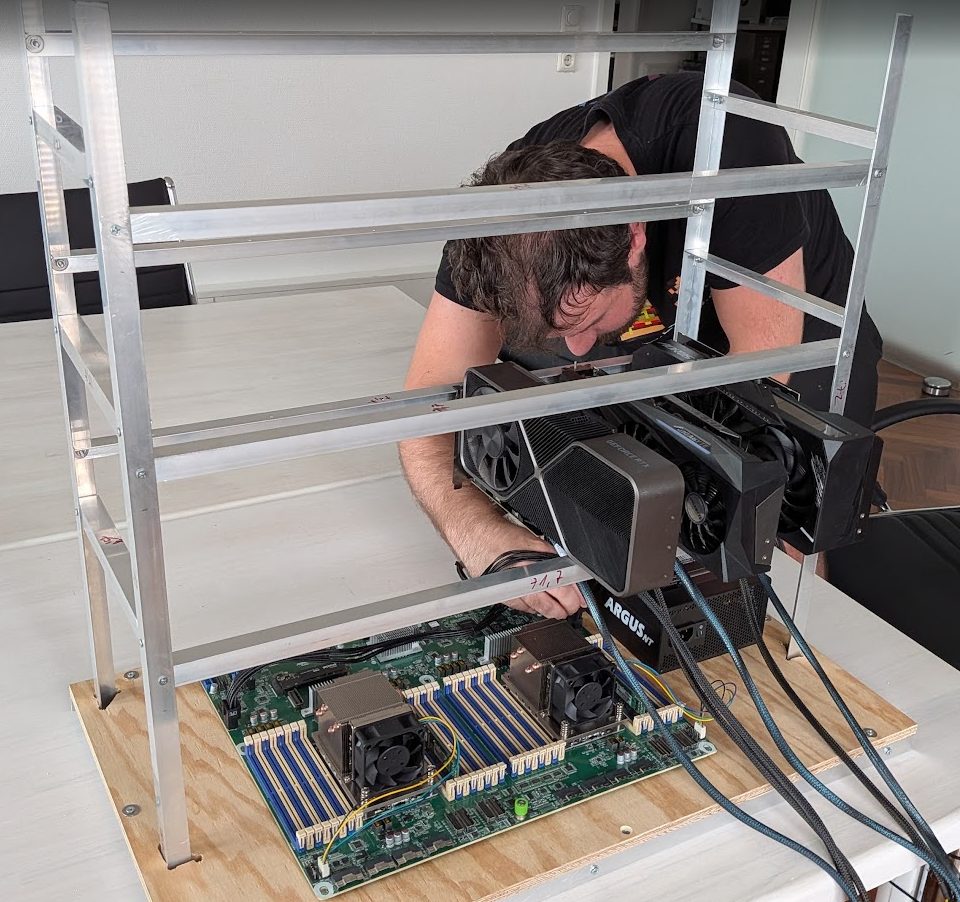
The memory has since been expanded: from two modules to six, two channels on the first CPU, four on the second, 184 GB in total. Whether eight channels per socket would buy anything on top of that we have not measured — the bottleneck looks resolved.
Everything on one socket
The second half of the cleanup was how the cards are distributed. When a card group crosses the socket boundary, some of the round trips through main memory pick up an extra detour across the second CPU — exactly the link that may turn out narrower than usual on this board.
| Cards per model | Recommendation |
|---|---|
| up to 9 | one socket, either one |
| 10 | all of them on the second CPU |
| two models in parallel | one per socket — the ideal case |
| 11 to 19 | socket boundary unavoidable, measure first |
Nine of the ten cards now hang off the second CPU. For the service we sorted things one step finer: one of the two clusters occupies the only group of four in the rig in which all six card pairs run through the same host bridge — the distribution stage inside the CPU that several slots hang off. In every other group of four, at least one pair would have to take another detour.
The gap that no longer exists
For a while in late August it looked as if the board had cost us something. Same service, same physical cards, same configuration apart from the random seed — and the median on the new rig came in 11.7 percent below the old one. That number now carries a caveat that changes everything about it: it was measured in a state that no longer exists.
| Condition | at the measurement in late August | today |
|---|---|---|
| Memory channels | 1 per CPU, 61 GiB | 2 on the first, 4 on the second CPU, 184 GB |
| Card distribution | spread across both sockets | nine of ten on the second CPU |
| Cabling | one defective riser cable, sync flood crashes | replaced, Gen4 stable |
| Thermals | two cards actively throttling | unremarkable after the rebuild |
| Usable cards | 7 of 10 | 10 of 10 |
Seven usable cards, a single memory channel per CPU, card groups spread across both sockets, one defective cable in the build and two throttling cards: under those conditions the measurement was a snapshot of a construction site, not a statement about the platform.
After the cleanup, both clusters reach over 120 tok/s and are therefore at the level of the old rig. A single short-run measurement produced 120.69 tok/s against 124.29 before, 2.9 percent apart. With a spread of ±13 tok/s that is not a detectable effect — and it stays a single measurement either way.
For completeness, the original measurement series. The comparison was against the predecessor board — a single-socket system with one EPYC 7443P of the Zen3 generation and five populated memory channels — using the same model, the same cards and a byte-identical configuration: 555 of 555 startup arguments identical, only the random seed differed. In production the old rig reached a median of 114.09 tok/s over 15 runs, the new one 100.74 tok/s over 21 runs in its broken interim state. Those figures describe the rig before the memory expansion, before the recabling and with three cards missing; as a platform comparison they are no use.
What does survive from the series is the measurement discipline. Across 54 individual runs the values spread between 71.98 and 122.32 tok/s, with a standard deviation of 11.20 tok/s. Measure three runs per configuration and you get a standard error of around 6.5 and a confidence interval of ±13 tok/s. Effects below 15 percent are invisible in that. In late August we nevertheless derived causes from samples of three several times, and those causes later turned out to be scatter. Since then the rule for this rig is: at least 10 to 15 runs per configuration, at a controlled, identical starting temperature.
The explanation we clung to longest was the CPU generation. Zen2 has a structurally higher memory latency than Zen3, its boost clock is lower, and at roughly 22,000 round trips through main memory per second that ought to show. We seriously considered swapping in two CPUs from the 7003 series. That explanation is no longer needed: it was there to account for the 11.7 percent, and the 11.7 percent are gone. The architectural differences between the two generations remain real; in this load profile they apparently cost nothing measurable. Which takes the CPU swap off the table.
We tried and discarded a fair amount along the way:
| Hypothesis | Test | Result |
|---|---|---|
| Pinning processes and memory to one socket helps | container bound to the cores and memory of one socket | memory demonstrably local, no throughput gain |
| The power-saving states of the PCIe link cost latency | disabled and verified on every connector | no effect |
| The CPU clock is too low | clock measured under load | boosts to 3,350 MHz, the maximum |
| Memory bandwidth is the limit | calculated | around 12 percent utilized |
| PCIe bandwidth is the limit | calculated | around 2.7 percent utilized |
| Direct card-to-card exchange was active on the old rig | container configurations compared | wrong, disabled on both rigs |
Where things stand
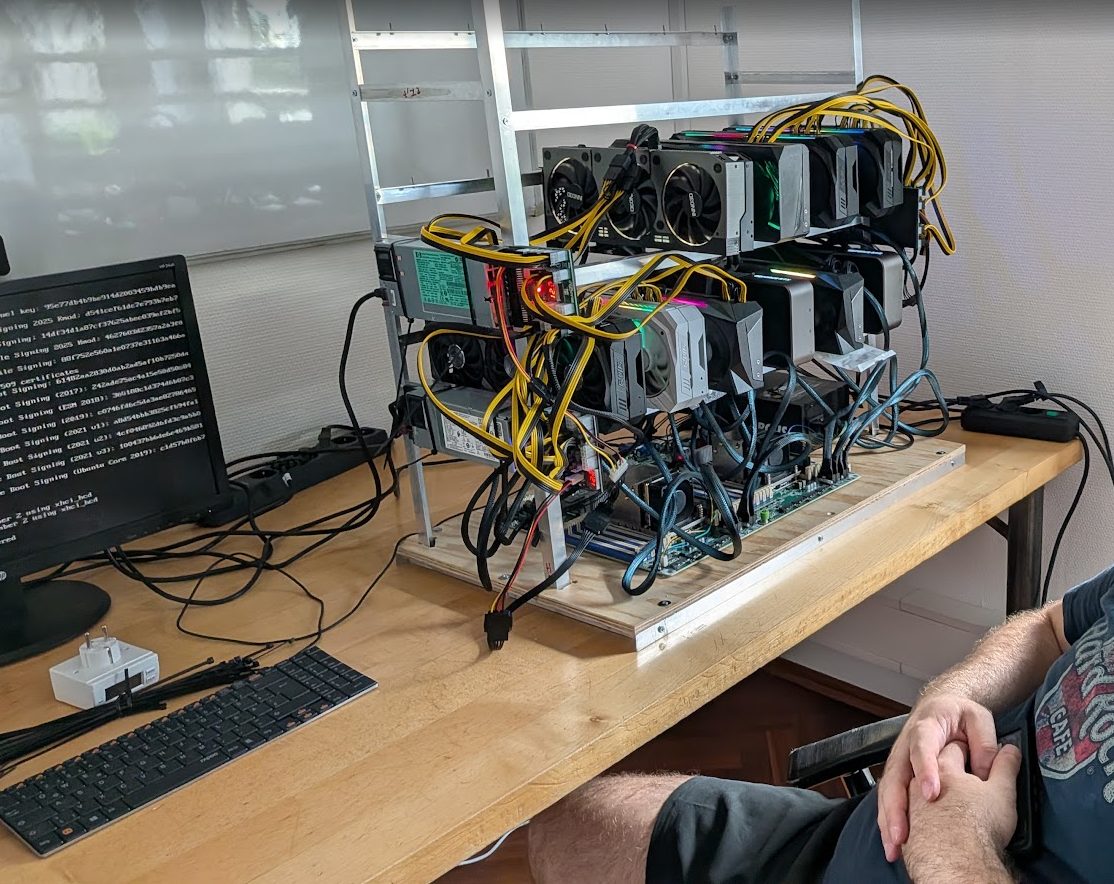
Ten cards in operation, all at full link width, no driver error in the log: four ASUS, three Gigabyte, three NVIDIA Founders, one of them a 3090 Ti. Nine hang off the second CPU, one is still on the first. Moving it is on the list, because as long as it sits there, a model spread across all ten cards would inevitably cross the socket boundary.
We still do not know what a socket crossing really costs. The measurement plan is set: two cards stay the same in both configurations so that the socket change is the only variable, at least ten runs per side, at the same starting temperature and with a temperature log.
The other open item is the chassis. As long as the cards stand this close together in the old frame, an eleventh card is not a good idea; the two cards that throttled under sustained load were the warning. So the expansion continues in this order: aluminum and spacing first, then cards.