
#1 · Eight RTX 3090s, Seven Slots, and an Awful Lot of Cables: How We Built Our Local LLM Rig
192 gigabytes of VRAM, spread across eight consumer GPUs. On paper, that reads like a fairly simple procurement exercise: buy eight used RTX 3090s, plug them into a server, start inferencing. Somewhere around the eighth cardboard box, it dawns on you that “owning eight GPUs” and “running eight GPUs stably in one machine” are separated by a substantial amount of actual engineering.
Our rig grew over several months. Today it consists of seven RTX 3090s, one RTX 3090 Ti, an AMD EPYC 7443P, and a Supermicro H12SSL-i. Together the cards bring 192 GB of VRAM — enough for large quantized language models, long contexts, and even for running two models at once on separate groups of four.
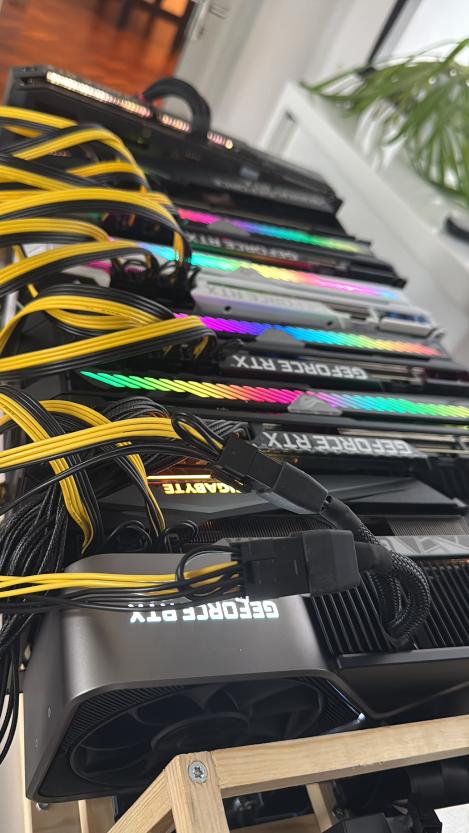
Getting there took a PCIe bifurcation card, eight full-blown PCIe 4.0 risers, four power supplies, several breakout boards, and a homemade wooden frame. The result does not look like a server out of a glossy brochure. It looks like exactly what it is: a capable test bench where nearly every cable could tell you a story.
Why used RTX 3090s, of all cards?
For local LLM inference, the RTX 3090 remains an unusually attractive card. Its 24 GB of VRAM is enough to shard models across multiple GPUs in a sensible way. Memory bandwidth is high, and — just as important — the cards actually exist in quantity on the used market. At this scale, single-GPU compute is only part of the story. What decides the build is how much usable VRAM and memory bandwidth you can assemble for a given budget.
The alternative would be datacenter hardware, which is nicer in every way that costs money: more memory per card, professional cooling, platforms actually designed for multi-GPU operation, far less improvisation around power and mechanics. The purchase price sits in a different order of magnitude, though. We were never trying to replace an H100 or H200 server (an H200 currently runs about 32,000 euros per GPU). We wanted as much local VRAM as possible for real inference and agent workloads, with full control over which models, quantizations, and runtimes we deploy.
That H200 figure is a market snapshot from August 2026; depending on vendor, lead time, and configuration, the actual purchase price can differ substantially.
The math has shifted since we bought, mind you. In December 2025, used RTX 3090s mostly went for around 650 to 700 euros. Eight cards already adds up to 5,200 to 5,600 euros, before any premium for the 3090 Ti. These days we see plenty of listings above 800 euros, and asking prices north of 1,000 euros keep multiplying. Eight cards at 800 euros each is at least 6,400 euros; at 1,000 per card, you are looking at 8,000. That is no longer market noise — it is the used market responding loudly to rapidly climbing new-card prices and to demand for anything carrying 24 GB.
The platform underneath the GPUs
The base of the system is deliberately not a typical mining platform. We need wide PCIe links, because large models push their weights across the bus at load time, and tensor, pipeline, or layer parallelism generates inter-GPU traffic during inference.
| Component | Our build |
|---|---|
| CPU | AMD EPYC 7443P, 24 cores / 48 threads |
| Mainboard | Supermicro H12SSL-i |
| System memory | 256 GB DDR4 |
| GPUs | 7× RTX 3090 + 1× RTX 3090 Ti |
| VRAM | 192 GB total |
| PCIe | 5× x16 and 2× x8 on the board, eighth link via bifurcation |
| NVLink | none |
The EPYC 7443P provides 128 PCIe lanes. The H12SSL-i breaks out five physical slots at x16 and two at x8. That gives the board seven suitable slots. We have eight GPUs. No amount of determined recounting fixes this.
Eight GPUs on a board with seven slots
The H12SSL-i supports PCIe bifurcation in the BIOS: one x16 connection is logically split into two x8 links. A matching splitter card breaks those two links out, turning a single physical mainboard slot into two usable GPU connections.
We use this x16-to-2×x8 bifurcation solution for the job. The critical part is that both the mainboard and the card support the split cleanly. A passive adapter cannot conjure up extra PCIe lanes. All it can do is carry the split the BIOS provides, electrically intact, out to two connectors.
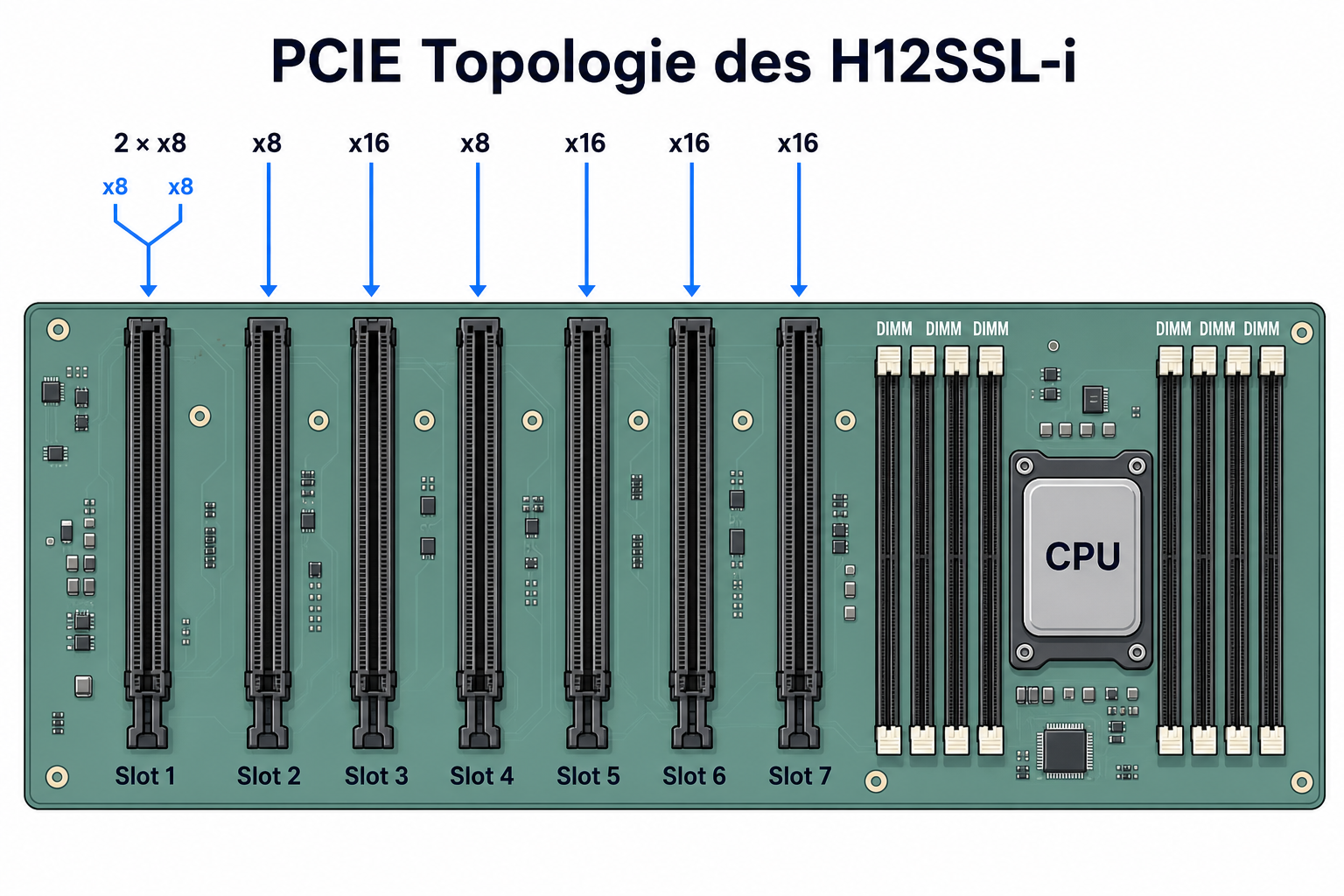
Here is our actual slot mapping:
| GPU | PCI address | Physical slot | Link | Card |
|---|---|---|---|---|
| 0 | 01:00.0 |
SLOT6 | x16 | RTX 3090 |
| 1 | 41:00.0 |
SLOT2 | native x8 | RTX 3090 |
| 2 | 42:00.0 |
SLOT4 | native x8 | RTX 3090 |
| 3 | 81:00.0 |
SLOT7 | x16 | RTX 3090 |
| 4 | 82:00.0 |
SLOT1, bifurcated | x8 | RTX 3090 Ti |
| 5 | 83:00.0 |
SLOT1, bifurcated | x8 | RTX 3090 |
| 6 | c1:00.0 |
SLOT3 | x16 | RTX 3090 |
| 7 | c2:00.0 |
SLOT5 | x16 | RTX 3090 |
When describing a build like this, three numbers get tangled up easily. The physical slot only tells you which connector shape sits on the board. The electrical width tells you how many lanes that slot is actually wired with. And the negotiated link is what generation and width the GPU and the root port really agree on in the running system. A full-length x16 socket can be wired for just x8; a connection meant for x8 can, in a fault condition, train down to far less width or speed.
This distinction matters more for debugging than for shopping. Two of the H12SSL-i’s slots are native x8 per spec. If lspci reports x8 there and tacks on the word downgraded, that does not necessarily mean four or eight lanes have died. Some tools compare against what the GPU could do, not against how the slot is wired. Likewise, a link can drop to 2.5 GT/s at idle thanks to PCIe power management and jump back to Gen4 under load. Only measurements under load will tell you whether there is a genuine problem.
Bifurcation adds one more layer. It behaves nothing like a PCIe switch, which dynamically shares a single upstream link between several devices. The BIOS carves the 16 available lanes into two fixed groups of eight, and both GPUs then show up as independent devices. The operating system sees a clean topology; the mechanical build sees two full riser connections coming out of one mainboard slot.
For inference, x8 is no serious obstacle in our setup. We have measured less than five percent loss versus x16 in comparable configurations. That is not the same as saying the PCIe link is unimportant. The gap between a healthy Gen4 x8 link and one that has quietly fallen back to Gen1 is enormous. Those failures get their own extended treatment in part two of this series.
The topology is also messier than the number 128 suggests. The eight cards appear in the system behind four PCIe root complexes. There is no NVLink, and direct GPU-to-GPU communication on GeForce cards is nothing you can take for granted in this constellation. Our production runtimes deliberately steer clear of the problematic P2P paths. For the physical build, the lesson boils down to this: wide links help, but a connection you can trust beats a theoretically perfect topology diagram.
Why we use proper PCIe 4.0 risers
Eight RTX 3090s do not physically fit side by side on a mainboard. Depending on the model, each card swallows two and a half to more than three slots. Even with seven connectors on the board, you cannot plug seven air-cooled 3090s straight in and still expect air to exist between them.
So every GPU hangs off an external PCIe riser cable. These are not the cheap x1 USB risers familiar from classic mining rigs. We carry the full PCIe connection outside the board and want Gen4 at x8 or x16, reliably. At 16 gigatransfers per second per lane, a riser stops being a cable and becomes an RF component. Shielding, trace routing, connectors, and mechanical quality stop being cosmetic details.
Our risers cost about 45 euros apiece. This PCIe 4.0 x16 riser cable is one example that works for us. Eight of them lands you at roughly 360 euros — genuinely irritating money for something that looks like an extension cord. But a bad riser can wreck the throughput of the entire array or make a GPU vanish from the bus under load. Measured against that debugging time, 45 euros suddenly loses most of its sting.
An expensive cable does not solve the mechanics on its own, either. Risers need to sit in their slots free of tension and lateral pressure. In our first build, several thick cable bundles ran close past each other and pushed on each other’s connectors. We later had to carefully strain-relieve individual cables and hold them in position with small supports. The resulting electrical fault looked exactly like a software problem — and was born from a few millimeters of mechanical stress.
The first frame: wood, short runs, and not enough air
Our frame is made of wood and carries the GPUs above and beside the mainboard. It was quick to build, easy to modify, and sturdy enough to hold eight heavy cards plus their cabling. It got us to a working system fast.
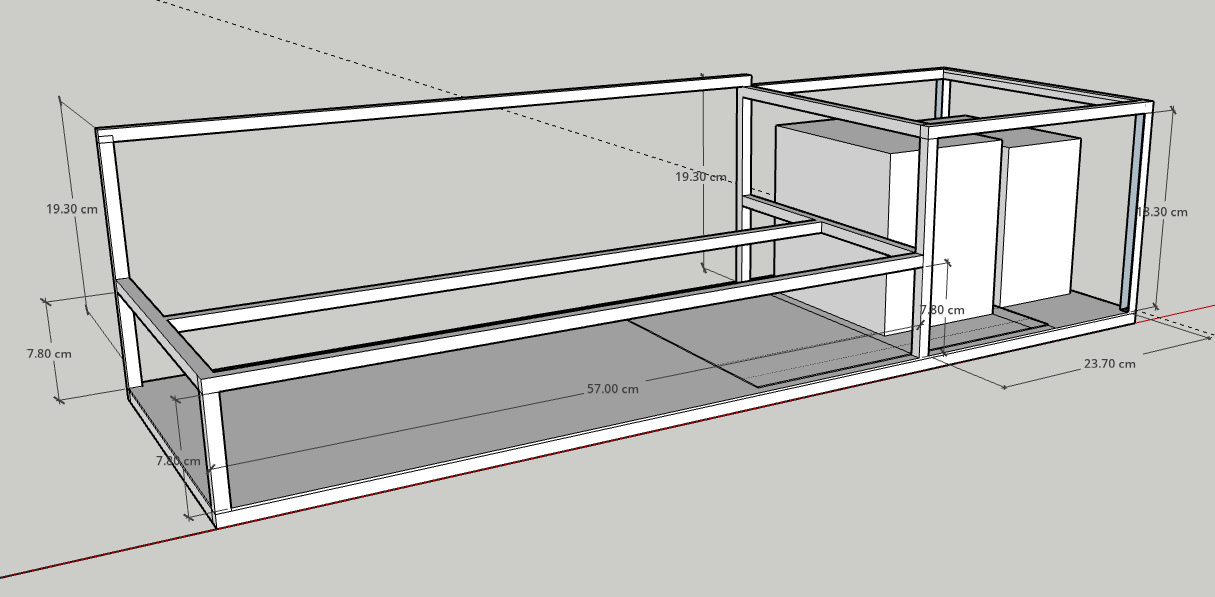
To keep things simple at the start, we housed the eight cards in this deliberately plain wooden stand — first sketched as a CAD model, then built in a few hours. In the model, everything still looks tidy; only live operation revealed that we had planned the GPUs a touch too close together. More on that in a moment.
The photo shows the frame’s biggest weakness just as plainly: the cards stand too close to each other. One RTX 3090 moves a lot of heat; eight of them produce their own little weather report. Axial fans work best when they can actually pull in air. If the backside of the next card sits a few centimeters in front of a fan, fresh air quickly turns into preheated recirculated air.
We are already building a second frame with larger gaps and better cable routing. That is not a cosmetic makeover. More spacing lowers intake temperatures, takes strain off the riser connectors, and creates room to route power cables with proper bend radii. Right now, in summer, several extra fans stand parked directly in front of the rig. Just how much bad cooling costs you in inference speed was one of the less pleasant lessons of day-to-day operation.
Four power supplies instead of one very big one
Power delivery is split into two functional domains. Per spec, the PCIe slot feeds a card up to roughly 75 watts. For all eight GPUs, that slot power arrives via mainboard and riser from the 1200 W ATX supply. The same ATX unit powers the mainboard, CPU, and system memory, and additionally feeds the 6/8-pin connectors of one GPU.
The auxiliary power connectors of the remaining seven GPUs are spread across three HP server power supplies:
| PSU | Role |
|---|---|
| 1200 W ATX | Mainboard, CPU, slot power for all eight GPUs, plus aux connectors of one GPU |
| HP 1200 W | Aux connectors of three GPUs |
| HP 1600 W | Aux connectors of three GPUs |
| HP 750 W | Aux connectors of one GPU |
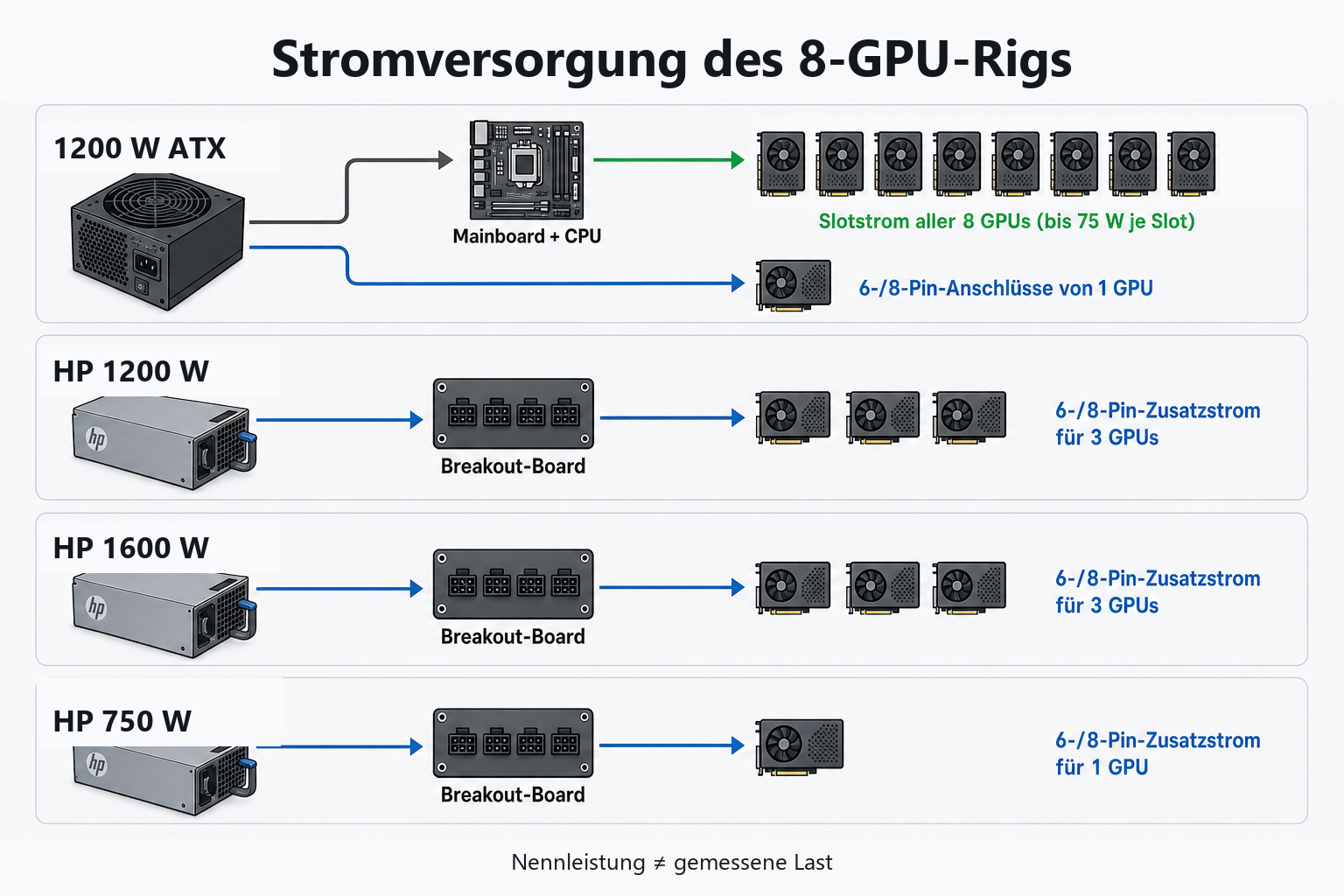
The HP units are server modules. The 1200 W model is a supply for the HP DL580 G7, DL380 G7, and D6020, part numbers 579229-001 and 578322-B21. A breakout board provides the required PCIe outputs; from there, 6+2-pin cables of about 50 centimeters run to the cards.
Every GPU is therefore fed along two paths. The passive riser carries the slot power from the mainboard to the card alongside the PCIe signals. The PCIe cables plugged into the top of the GPU deliver the larger auxiliary share from whichever supply that card is assigned to. The 1200 W ATX unit consequently carries not only CPU and mainboard but the base load of all eight cards at the same time. The HP modules relieve it on the auxiliary connectors — they do not replace the power path through the slot.
We are spelling this out because a photo of all those yellow-and-black cables easily gives the wrong impression. You might assume each GPU hangs entirely off exactly one server PSU. In reality, mainboard and auxiliary supply share the job, so counting visible PCIe cables tells you neither the ATX unit’s load nor the rig’s total draw.
The nameplates of the four sources add up to 4,750 watts. That is not the real sustained consumption and should not be read as such. The split buys headroom and distributes the extra GPU connectors across several supply branches. What it does not guarantee is that every arbitrary grouping stays stable. Originally, the 1600 W HP unit fed the auxiliary connectors of four GPUs. In that configuration, one card would sporadically drop out. Only redistributing one GPU onto the 750 W module we had on hand made the failure pattern disappear. The full story belongs in the operations article, because without its diagnostic timeline it would read like a blanket verdict on 1600 W power supplies. It is not one.
What this build actually costs
With a multi-GPU rig, the cost conversation likes to fixate on the graphics cards. They are the biggest single line item, but at eight cards, the seemingly small parts pile up as well:
- eight PCIe 4.0 risers at roughly 45 euros each,
- a bifurcation card that actually works,
- additional x8-to-x16 adapters, wherever a position needs one,
- three HP server power supplies on top of the ATX unit,
- breakout boards and a small mountain of 6+2-pin cables,
- material for the frame, mounts, and strain relief,
- extra fans and measurement gear.
Adapters and risers, of all things, are the wrong place to sort purely by lowest price. We had one x8-to-x16 adapter that simply did not work. Parts like that cost more than their sticker price: they buy you debugging sessions in which GPU, driver, riser, mainboard, and PSU all look equally guilty at first.
GPU price movement makes a rebuild more expensive today than in late 2025, which is why our dated math matters more than some supposedly timeless grand total. Anyone planning a similar system should also budget a substantial line for cabling, power distribution, and cooling. Eight cards are not a desktop PC with an unusual number of side panels. They are a small compute system, with the infrastructure needs to match.
We deliberately give no retroactively smoothed total price. Some components carry our purchase prices from back then; other parts were already lying around before the project began — the 750 W HP supply, for instance, which later played an important role. A grand total would look more precise than it could honestly claim to be. What does hold up: the dated GPU prices, the roughly 45 euros per riser, and the realization that eight working data and power paths claim a meaningful share of the budget.
What we get in return
The finished rig provides 192 GB of VRAM. We can spread one large model across all eight cards or split the GPUs into groups. A typical current allocation is a Qwen model on four cards and Laguna S 2.1 on the other four. In that state, our dashboard shows 187.7 of 192 GB of VRAM in use. The hardware was clearly not installed as decorative reserve.
Token rates vary wildly by model and runtime. Those differences depend not just on parameter count but on quantization, active MoE share, tensor or pipeline parallelism, context length, and the kernels involved. If we crammed the build and all model benchmarks into a single post, the hardware construction would once again come up short — so detailed model measurements go into posts of their own. Here it is enough to note that the build makes large local models and parallel four-GPU instances a practical reality.
The bigger difference from a turnkey datacenter solution lies in operations anyway. Eight used consumer GPUs on riser cables forgive neither bad contacts nor uneven cooling. The rig can run at full speed in the morning and noticeably slower by afternoon without any application reporting an obvious error. It can negotiate a PCIe link down, fill AER counters, or lose a card with the remarkably laconic message GPU has fallen off the bus.
That is exactly what part 2 of this series, “When your GPU gets run over by the bus,” is about — 450 watts of idle draw, power spikes up to 3.1 kilowatts, summer heat, power limits, mechanically stressed risers, and how to tell whether the model, the driver, the power delivery, or just a cable is currently making trouble.